ကြန္ပ်ဴတာနည္းပညာဆိုင္ရာ ေဆာ့ဝဲလ္မ်ား၊ သင္ခန္းစာမ်ား စုစည္းထားသည္။

Showing posts with label Google_Apps. Show all posts

Saturday, June 25, 2022

How to recover Deleted Data in Google Sheets

Sometimes we might erased some data. However we can still use Undo / Redo to get back our data. Note: there is a 20 times limitation for Undo / Redo. If so, you can quickly recover a former version of your Google spreadsheet by the following instruction.


hfgh
Share:

Thursday, June 16, 2022

How To Restore Deleted Google Sheets Files

In this post, we would to share about how to restore deleted Google Sheet File in Google Drive. If you mistakenly deleted your Google Sheet file, you can recover it from the Google Drive trash bin. 
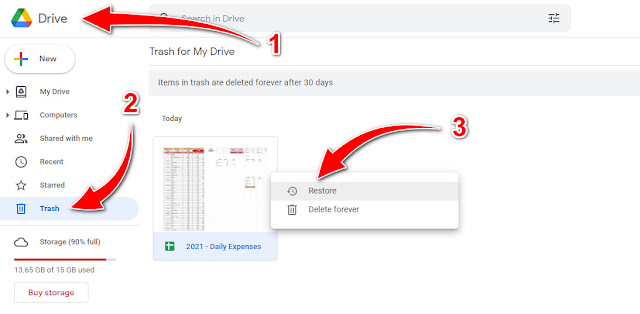


How to Recover Deleted Google Sheets

1. Open your Google Drive.
    Google Drive ကို ဖွင့်ထားပါမယ်။
2. Go to the Trash Bin.
    ဘယ်ဖက်ခြမ်းရှိ အမိုက်ပုံ Trash ကို နှိပ်ပါမယ်။


3. Right-click on the Google Sheets file that you would like to restore.
    မိမိပြန်ခေါ်ယူလိုသော ဖိုင်တစ်ခုပေါ်တွင် ညာခလစ်နှိပ်ပြီး၊ Restore ကို နှိပ်ပါမယ်။
    (သို့မဟုတ်) Delete Forever ဖြစ်လဲ အပြီးဖျက်ထုတ်နိင်ပါတယ်။

*** Done! Thank you! ***


Share:

FOLLOW US

i-Kayan IT     Getintopc.com Twitter     Subscribe Getintopc.com

Blog Archive

Featured Post

Epson L360 Resetter Tool Download for Free, Adjustment Program Tool without password: Solved 100%

Today's sharing is an Epson L360 resetter adjustment program tool. This tool can be used on Epson L130, L220, L310, L365 printers. Usin...

Total Pageviews