ကြန္ပ်ဴတာနည္းပညာဆိုင္ရာ ေဆာ့ဝဲလ္မ်ား၊ သင္ခန္းစာမ်ား စုစည္းထားသည္။

Monday, May 30, 2022

Win Innwa and Win Font Group Free Download (Myanmar Fonts Style)

Win Innwa and Win Font group are good to use for designing, publishing books with beautiful font style. It has become popular as it is useful and can solve many complicated Myanmar character issues. There are many types of Win Font style. Free download Win fonts and Myanmar fonts.


Win Font Group Download


Win Myanmar Fonts

ဝင်းဖောင့်အမျိုးအစားများ စုစည်းထားပါတယ်။ မတူညီတော့ စာလုံးအမျိုးအစားများကို လင့်ခ်တစ်ခုချင်းစီ ခွဲပြီး ထည့်သွင်းထားပါတယ်။ မိမိလိုအပ်သော၊ နှစ်သက်သော စာလုံးအမျိုးအစားများ လွတ်လပ်စွာ ဒေါင်းယူနိုင်ပါတယ်။ ကျေးဇူးတင်ပါတယ်။
WIW070
WIW090
WIW130
WINNWAB
WIW110
WINTHATO
WINPULAW
WINMONYWAR
WINMHL
WINHEART3
WINEUROP
WINCARTOON
WINBOKEPYIN
WILLY-H
WINKAWTHAUNG
WINTAUNG
WINLAY

Win AmaraPura Font, Win BeikThaNo Font, Win Dagon Font, Win Dawei Font, Win Haka Font, Win Innlay Font, Win Innwa (with bold) Font, Win Innwa, Win Kalaw Font, Win KyaukMae Font, Win KyaukTan Font, Win KyeMone Font, Win KyineTone Font, Win LarSho Font, Win Loikaw Font, Win Magway Font, Win Mandalay Font, Win Mawlamyine Font, Win MeikHtiLar Font, Win MoneYwar Font, Win Monotype (with bold) Font, Win MonotypeNew (with bold) Font, Win MyitKyiNa Font, Win NyaungShway Font, Win PaAnn Font, Win PaThane Font, Win Pyay Font, Win PyinMaNar Font, Win Researcher (with bold) Font, Win SaGaing Font, Win SitTway Font, Win ShwayBo Font, Win TaungGyi Font, Win TaungNgoo Font, Win ThanLyin Font, Win ThanDwe Font, Win ThuWunna Font, Win Typewriter Font, Win WingDings Font, Win Yadanapone Font, Win Yangon Font


Share:

Thursday, May 26, 2022

How to Check Your Computer has HDD or SSD on Windows 10/ 8/ 7 (Easy)?

In this post, we share how to check your computer is used HDD or SSD drive. The type of Hard Drive or the Internal storage drive installed on a computer can either be HDD (Hard Disk Drive) or SSD (Solid State Drive) type. The easiest way to check the type of Hard Drive or storage installed on a computer is to open the Defragmenter or Optimize Drives utility.


Method 1: Find If Your Drive is SSD or HDD Using Disk Defragmenter

1. Simply press the Windows key + R keyboard shortcut to open the Run box, type dfrgui and click OK or press Enter.

<< သို့မဟုတ် >>
1. Click on Search button and type "defra ..." . Then click on Defragment and Optimize Drives on the top of the search list.

2. In the Optimize Drives windows, you will see Media type for each drive. In the list, there are three drives. But all are HDD (Hard Disk Drive) types. If your drive is SSD, it will show Solid State Drive in the list.


*** I hope it will be Okay. Thank you for your time!

Video Instruction: How to Check Your Computer has HDD or SSD on Windows 10/ 8/ 7 (Easy)?


Share:

Wednesday, May 18, 2022

How to create multiple YouTube Channels under one Email address

In this post, we are going to share how to create multiple YouTube Channels under on Email address. This means that to create multiple channels, you need a starter Google account created using your email address. OK, let's see how it works.


1. Open YouTube website in a browser and Sign In to  YouTube.


2. Open the operations menu by clicking on your Gmail profile picture.

3. Then click on Settings.


4. Click on Add or Manage your channel(s). (or) If there is no channel yet, Click on Create a new channel.


5. Enter a name for your new channel. If you’re a business, you should generally use your company’s name. That way, your viewers will instantly recognize your brand.


6. Click on Create button to complete the process.

Once you’ve taken the above steps, YouTube will instantly create a new channel and direct you to your channel dashboard. You can now proceed to create more channels– all under your brand account.


You can also customize a newly created channel by adding things like a detailed description, contact email, and location.

Done! Thank you!

Share:

Tuesday, May 17, 2022

Windows 11 အဆင့်တိုးမြှင့်နည်းနဲ့ အဆင့်မတိုးမြှင့်မီ အခြားသိသင့်သော အချက်များ

 အားလုံးသိတဲ့အတိုင်းပါပဲ Microsoft ကတော့ Windows 10 ကနေ Windows 11 ကို အဆင့်တိုးမြှင့်လိုက်ပါပြီ။ Windows 11 ရဲ့ မြင်ကွင်းပုံစံ၊ icon ဒီဇိုင်းတွေက windows 10 နဲ့တော့နည်းနည်းလေးကွဲပြားပြီး တစ်မျိုးစီ ဆွဲဆောင်မှုရှိတော့ သုံးချင်တဲ့စိတ်က ပိုမိုပေါ်ပေါက်လာတယ်လေ...

Share:

Wednesday, February 23, 2022

How to permanently delete Google Account (Google Account အပြီးဖျက်နည်း)

In this post, we are going to share how to permanently delete your Google Service or Google Account. After deleting the account, the account must have been deleted no more than 20 days ago and all its associated data, is permanently deleted, and Google cannot recover it.


>> Instructions <<

1. Log In to the gmail account that you are going to delete.
2. Click on the profile icon on the right top of the Chrome windows.
3. Then click on Manage your Google Account.


4. Click on Data & personalization. Then choose Delete a service or your account.


Share:

Monday, February 21, 2022

Ready to use Photoshop PSD File for photo frame and religious ceremony

We would like to share a collection of Photoshop PSD file for photo frames and religious ceremony use. Check it out and use the link below to download the file. 


WinRAR File Size (83.6 MB)

Downloand

MEGA link >> https://mega.nz/file/J5tgmZIJ...

Credit to >> https://www.facebook.com/စွန်ရဲ-သား-နည်းပညာ-2022930344670291/

Share:

How to install and activate 3D for Adobe Photoshop CS6.

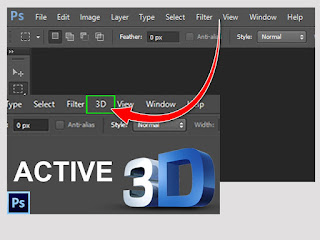
This post is shared for those who doesn't have 3D menu in Adobe Photoshop CS6. Some version of Adobe Photoshop CS6 didn't include 3D menu. This post instruct you how to activate 3D menu. Please see the instruction below. If you have any question, please leave the comment under the post.


>> How to download <<

WinRAR File Size (1.35 MB)
Downloand

MEGA link.....
https://mega.nz/file/spcW3bxY...


>> How to Install ထည့်သွင်းအသုံးပြုနည်း <<

1. After downloading the file.

2. Extract the file.

3. Click on the file and run as administrator

Credit to: https://www.facebook.com/စွန်ရဲ-သား-နည်းပညာ-2022930344670291/


Share:

Could not find this item, this is no longer located in …

Error Message: Could not find this item: This is no longer located in C:\Users\ …


Solutions: Use the Following Command to Delete the Problematic File

1. Search for “Command Prompt” and run as administrator.


2. Type this command, rd /s \\?\ FolderPaht to delete ( Example: rd /s \\?\C:Users\Sophean Un\... )

3. 1. Type “Y” to delete. And then the folder is deleting. DONE!


Share:

FOLLOW US

i-Kayan IT     Getintopc.com Twitter     Subscribe Getintopc.com

Blog Archive

Featured Post

Epson L360 Resetter Tool Download for Free, Adjustment Program Tool without password: Solved 100%

Today's sharing is an Epson L360 resetter adjustment program tool. This tool can be used on Epson L130, L220, L310, L365 printers. Usin...

Total Pageviews