Friday, June 10, 2022
English - Myanmar Online Dictionary for PC, Mac, IOS and Mobile (MYORDBOK)
Tuesday, June 7, 2022
Whizzo Myanmar Typing Tutor for practicing Myanmar Unicode (Easy)
This "Whizzo Myanmar Typing Tutor" application is to practice the Myanmar Unicode keyboard. This keyboard layout can be used for the Pyidaungsu keyboard, Myanmar Text and other Myanmar Unicode keyboards except for the Zawgyi Unicode keyboard layout.
>> Software Information <<
File Name - Whizzo Typing Tutor & Whizzo Dictionary>> Software Installation <<
1. Click to Download the software.
2. Right-click on the downloaded file and Extract the file.
3. Open Whizzo Typing Tutor to install.
4. For the installation, please follow the instructed screenshot below.
Monday, June 6, 2022
How to fix Pyidaungsu font error in Photoshop? Photoshop မှာ ပြည်ထောင်စုဖောင့် ရေးမရသူများအတွက် ပြင်ဆင်နည်း
File Name - Pyidaungsu-Book-1.8_Regular
File Type - ttf
File Size - 255 KB
Download - Pyidaungsu-Book-Regular
........................................................................................................................
File Name - Pyidaungsu-Book-1.8_Bold
File Type - ttf
File Size - 258 KB
Download - Pyidaungsu-Book-Bold
........................................................................................................................
File Name - Pyidaungsu-2.5.3_Numbers
File Type - ttf
File Size - 186 KB
Download - Pyidaungsu-Number
Tuesday, May 31, 2022
Zawgyi Font for APPLE - MAC OS
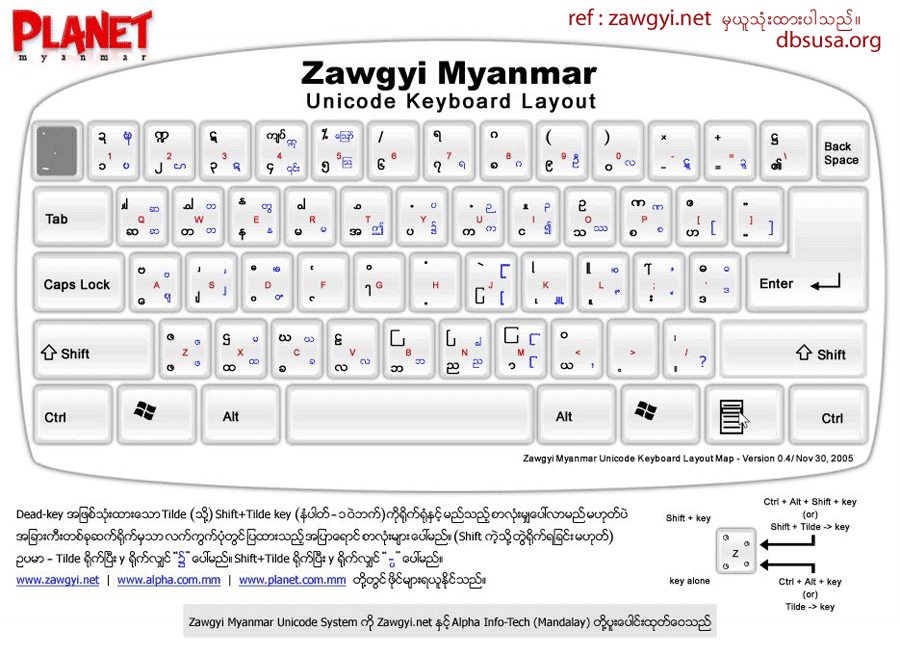
Here is the instruction for how to download and install Zawgyi Font (Burmese) in a MAC OSX (Apple Computer). Keyboard layout is the same with Windows, but do research yourself when you are trying to use (Alt) key in OSX (press and hold “Option”key down) instead of (Atl+Tide) key in Windows. ထပ်ဆင့စာလုံးတွေရိုက်ချင်ရင် “Option” key ကို ဖိထားရင်းရိုက်ရပါတယ်။ တစ်ချို့ကို “Option+Shift” သုံးရပါတယ်။
(2) Open it. Drag files into appropriate folder as the guide diagram
(3) Open System Preferences > Languages & Text > Input Sources > Zawgyi KB
……(Check mark “Zawgyi KB”, it will be at the bottom)
For OSX 10.9.1 (above) users, you can choose built-in Myanmar (QWERTY) keyboard at Input
(4) Remove “Myanmar MN” and “Myanmar Sangam MN” fonts from the Font Book
……( >Applications > Font Book)
(5) Restart your MAC
Zawgyi Keyboard layout Keyboard Layout
<< Download Zawgyi Font - Mac ( zawgyi.dmg) >>
Monday, May 30, 2022
Win Innwa and Win Font Group Free Download (Myanmar Fonts Style)
Win Innwa and Win Font group are good to use for designing, publishing books with beautiful font style. It has become popular as it is useful and can solve many complicated Myanmar character issues. There are many types of Win Font style. Free download Win fonts and Myanmar fonts.
Win Myanmar Fonts
WIW090
WIW130
WINNWAB
WIW110
WINTHATO
WINPULAW
WINMONYWAR
WINMHL
WINHEART3
WINEUROP
WINCARTOON
WINBOKEPYIN
WILLY-H
WINKAWTHAUNG
WINTAUNG
WINLAY
Win AmaraPura Font, Win BeikThaNo Font, Win Dagon Font, Win Dawei Font, Win Haka Font, Win Innlay Font, Win Innwa (with bold) Font, Win Innwa, Win Kalaw Font, Win KyaukMae Font, Win KyaukTan Font, Win KyeMone Font, Win KyineTone Font, Win LarSho Font, Win Loikaw Font, Win Magway Font, Win Mandalay Font, Win Mawlamyine Font, Win MeikHtiLar Font, Win MoneYwar Font, Win Monotype (with bold) Font, Win MonotypeNew (with bold) Font, Win MyitKyiNa Font, Win NyaungShway Font, Win PaAnn Font, Win PaThane Font, Win Pyay Font, Win PyinMaNar Font, Win Researcher (with bold) Font, Win SaGaing Font, Win SitTway Font, Win ShwayBo Font, Win TaungGyi Font, Win TaungNgoo Font, Win ThanLyin Font, Win ThanDwe Font, Win ThuWunna Font, Win Typewriter Font, Win WingDings Font, Win Yadanapone Font, Win Yangon Font
Thursday, May 26, 2022
How to Check Your Computer has HDD or SSD on Windows 10/ 8/ 7 (Easy)?
Wednesday, May 18, 2022
How to create multiple YouTube Channels under one Email address
Tuesday, May 17, 2022
Windows 11 အဆင့်တိုးမြှင့်နည်းနဲ့ အဆင့်မတိုးမြှင့်မီ အခြားသိသင့်သော အချက်များ
အားလုံးသိတဲ့အတိုင်းပါပဲ Microsoft ကတော့ Windows 10 ကနေ Windows 11 ကို အဆင့်တိုးမြှင့်လိုက်ပါပြီ။ Windows 11 ရဲ့ မြင်ကွင်းပုံစံ၊ icon ဒီဇိုင်းတွေက windows 10 နဲ့တော့နည်းနည်းလေးကွဲပြားပြီး တစ်မျိုးစီ ဆွဲဆောင်မှုရှိတော့ သုံးချင်တဲ့စိတ်က ပိုမိုပေါ်ပေါက်လာတယ်လေ...