


How to add both unicode and zawgyi font for being able to read in computer browsers? If you use Pyidaungsu font or Myanmar Text font for reading and writing, you will not be able to read Zawgyi font in your browser. In this case, this post will guide you how to add both fonts. Please follow the instruction below.
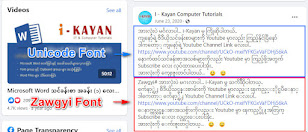
How to add both Unicode and Zawgyi font for being able to read in Google Chrome Browser?
1. Open Google Chrome Browser. Click More icon which is on the top right of the browser Browser.
2. Click on More Tools and click on Extensions.
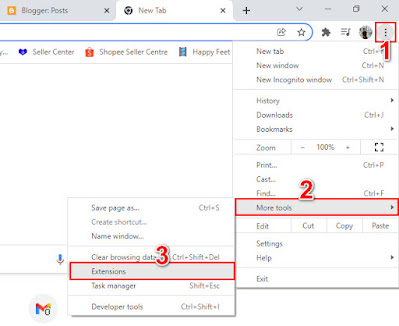
3. Extension windows tab will appear.
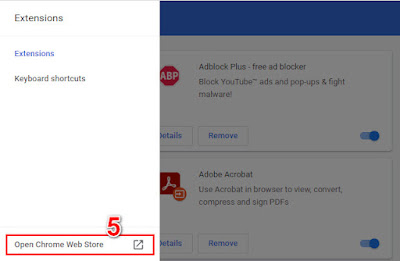
4. And then click on Extension's Main Menu Icon.

5. Click Open Chrome Web Store.
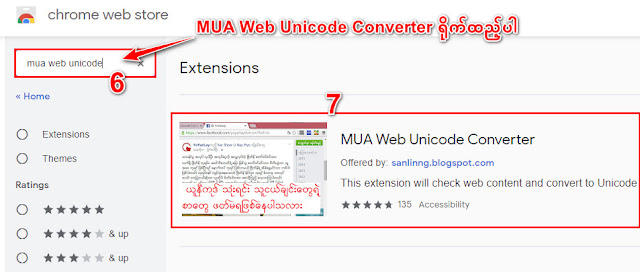
6. Find MUA Web Unicode Converter and click Enter button on your Keyboard.
7. Open MUA Web Unicode Converter from the extensions list.
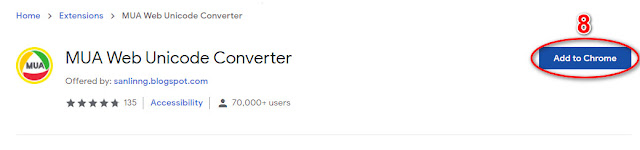
8. Click on Add to Chrome button to install extension.
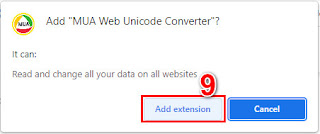
9. Then click on Add Extension button.
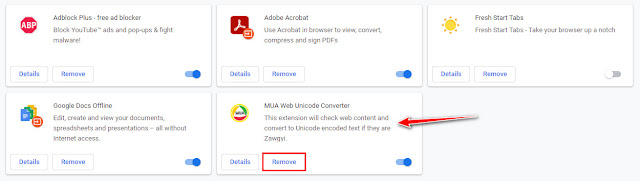
## Installation has been done. Please refresh your browser (or) restart your browser.
## Please leave your comments if you have any question or any request for more contents.
Thank you!


